31. Gleeble Computer Control and Software
31.1. Computer Control and Data Acquisition
All Gleeble systems are equipped with a Windows-based workstation and powerful embedded processor for testing control. The workstation and embedded testing control processor are linked by a high-speed data connection.
The Windows workstation offers a flexible industry-standard multi-tasking Graphical User Interface for creating simulation programs and analyzing the resulting data, as well as creating reports and presentations.
The embedded processor executes test and simulation programs and collects data under the control of the Windows program. This division of labor offers the full power of the workstation to the user while tests are running, enabling the operator to create new tests and analyze data while the machine is actively executing tests or physical simulations.
31.1.1. Standard Gleeble Workstation
Desktop Workstation
Each Gleeble system is supplied with a powerful workstation computer. The default workstation that is supplied is routinely updated to maintain the current features and capabilities. Each workstation will generally include the following capabilities.
Intel i7 8 Core Processor PC Computer:
- High capacity hard drive
- High speed data processing capability
- Flat panel display monitor
- USB communication ports
- Windows operating system
- Internal Wi-Fi for connectivity to the Gleeble system
The standard Gleeble workstation is supplied with:
- Microsoft Windows
- QuikSim2
- Origin
31.1.1.1. QuikSim2

QuikSim2 Software Features:
- Programs the GTC Digital Control System
- Independent Workstation
- Windows Based
- User Friendly
- Highly Flexible
- Password Protection
- Arbitrary Waveform Generation
- Table Form Software - Just fill in the blanks (standard)
- Provides full Windows multi-tasking during testing
Note
Current Gleeble users can access the QuikSim2 Operator’s Manual here.
31.1.1.2. Origin

Origin Software Features:
- Supports Laser Printers and Color Ink Jet Printers
- Creates Publication-Ready Data Plots
- Windows Based
- Powerful and Flexible
- Built-in Mathematical Functions
- Automatic Data File Loading After a Test is Run
- LabTalk Templates for Repetitive Plotting
31.2. Additional Gleeble Software
31.2.1. Gleeble Script Language (GSL)

The digital control system executes user programs written in a proprietary
script language designed for real-time control in the materials testing environment.
Programs are written in an English-like
verb-argument or preposition-argument format, stored in an ASCII
plain text file. Formatting is not critical.
Each command is written on a separate line. Each line may be optionally
commented.
The statements contained within a file are executed sequentially,
unless they are flagged with a concurrent execution operator,
or are part of a structured code segment (such as a subroutine).
Command verbs are designed to be control system independent.
The desired control axis is specified as an argument.
A script file is always the final control program that is sent to the digital control system at run time. However, because the script programming method is more difficult, Table programming, Hot Deformation Software (HDS), and Heat Affected Zone (HAZ) Software programming methods offer a simple graphical interface that the user can understand intuitively. By placing inputs in the graphical interface, the user creates a detailed outline of the test. Then, QuikSim2 automatically generates the appropriate Script program to control the Gleeble at run time.
Note
Additional guidance on GSL coding, commands, and features can be found in the QuikSim2 operator’s manual here.
31.2.2. Continuous Cooling Transformation (CCT) Software Package
DSI has developed a software package written for Origin that allows the user to generate continuous cooling transformation curves. This program is referred to as the Continuous Cooling Transformation Curve Generation Software (CCT/TTT). The program allows for up to ten transformations from each of up to 45 acquired cooling curve files.
The typical method used to measure the start and finish of phase transformations is to plot a dilation versus temperature curve for a given cooling rate. A straight edge is then used to determine the temperature and time at which the transformation(s) starts and finishes. The basis of the evaluation is the rate of change of the slope of the dilation vs temperature curve. A number of curves at different cooling rates are used to obtain data for the complete continuous cooling transformation diagram. The specimen can be rapidly quenched from representative temperatures to freeze the micro-structure and determine the products of the phase change through metallography.
A graphical method of analysis is the basis for the Continuous Cooling Transformation Curve Generation Software (CCT/ TTT). However, rather than performing the graphical analysis on paper, the analysis of the transformation is performed on the video display terminal. The keyboard or mouse is used to move a line along the dilation versus temperature curve and to vary the slope of the curve. When the transformation point is selected, the time and temperature of the point can be stored for analysis. The data is automatically plotted and can be modified to take into account subsequent metallographic analysis.
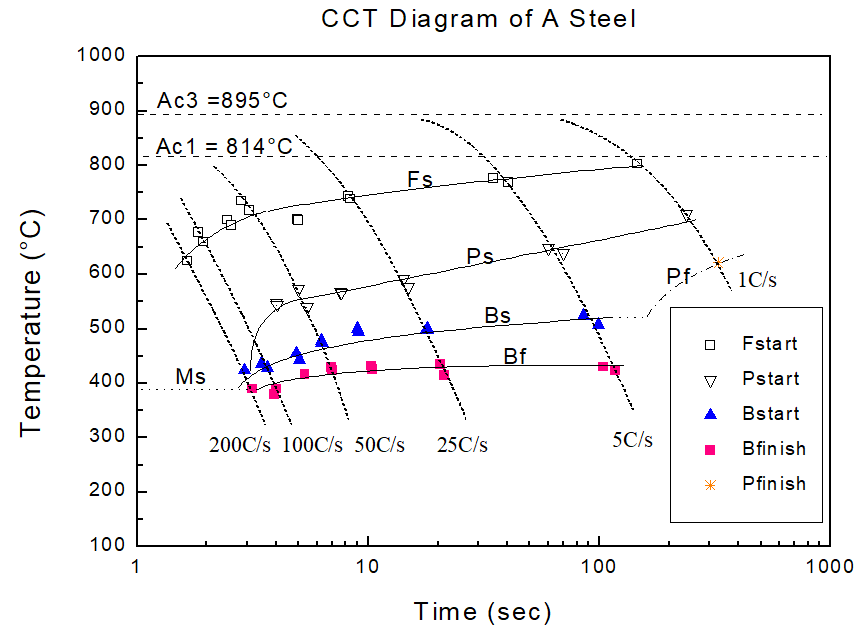
To help the user determine the transformation points, there are two computer software aids. One method is the use of a linear approximation to the dilation curve equation before and after transformation. A more precise method of analysis is to use a curve calculated from the equation for the thermal contraction curve instead of a straight edge. However, this curve is different for every material and crystal structure so it does not lend itself readily to analysis for many materials. Thus, the linear approximation to the cooling curve which provides a high level of accuracy is used since it is both versatile and convenient. As a second method , a numerical derivative method is available to help the user determine the phase transformation points. The second derivative of the dilation versus temperature can be plotted on the same dilation vs. temperature graph. The deviation points from and to a near constant line represent the start and finish points, respectively, of phase transformation.
The Gleeble provides accurate measurement of phase transformations. The CCT dilatometer or Laser dilatometer measures the change in diameter of the specimen. Since direct resistance heating is used in the Gleeble, the dilatometer and temperature measurement are taken on an isothermal plane. This means that the temperature at the surface of the specimen is the same as the temperature at the core of the specimen. Since the surface and the core of the specimen are at the same temperature, the transformation starts and finishes at the same time for all points in the isothermal plane. This results in accurate transformation data. The isothermal plane is maintained even during heating and cooling of the specimen.
The copper grips of the Gleeble allow for rapid cooling of the specimen without quenching. (Cooling rates depend on specimen geometry, grip material, conductivity of specimen and the condition of the grip system.) The excellent heating control of the Gleeble also makes it possible to program controlled linear cooling rates in the specimen. Newtonian cooling can also be used if desired.
31.2.3. Hot Deformation Software (HDS)
The Hot Deformation Software (HDS) is used to program the Gleeble and Hydrawedge for single or multi-hit deformations. The software uses a very intuitive user interface that graphically represents the steps of a multiple deformation simulation. The user can set all the parameters to control the thermal and mechanical aspects of the simulation from within HDS. After setting the parameters for each step of the process simulation, the HDS software creates a Gleeble Scripting Language (GSL) program that can be run directly or further modified to optimize the simulation program.
Note
Additional guidance on performing an HDS test can be found in the QuikSim2 operator’s manual here.
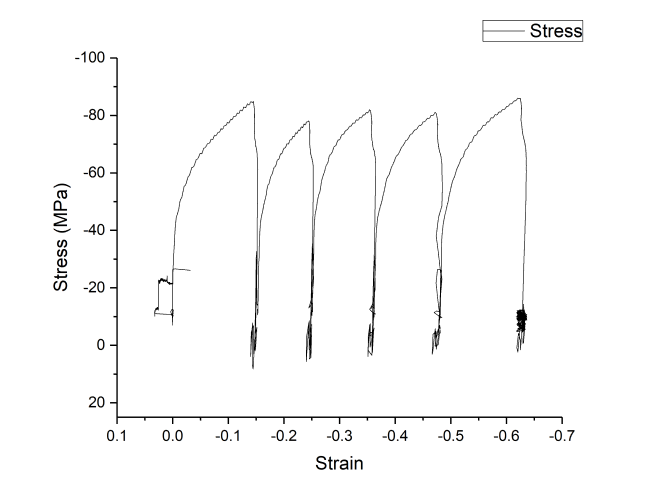
Fig. 31.1 Stress vs Strain curve created with HDS software
31.2.4. Heat Affected Zone (HAZ) Software

The optional HAZ software can generate single and multi-pass weld curves for use in weld simulation on the Gleeble. Below is a list of some of the major features of the HAZ software:
-6 curve generation methods
-Preview temperature program curve in Origin
-Single and multi-pass welds (up to 10 weld passes per program)
-Run HAZ programs directly, or output to a Gleeble Script Language file for further customization
Note
Additional guidance on performing an HAZ test can be found in the QuikSim2 operator’s manual here.
31.2.5. CTOME - LUMet Analysis Software
CTOME is computer software equipped with a Graphical User Interface. The user interacts with the data using a mouse and keyboard. Keyboard entries are used to input values or text in the readers. The operator uses buttons and drop-down menus to facilitate the data processing. Results are output as figures, as a pdf report, and as an ASCII data file that can be used for further manual processing. The software is dedicated to the processing of data in metallurgy. CTOME has been developed to be a powerful software for the metallurgical scientist that requires a fast access and treatment to large amount of data.
31.2.6. LUSGenCtrl - LUMet Control Software
LUSGenCtrl is the software created by Tecnar to control the firing and detection of the LUMet lasers.
| Part Number | Description | Sold As |
|---|---|---|
| COMO016 | QuikSim2 | Ea. |
| COMO14(X) | Origin | Ea. |
| 35515 | Hot Deformation Software (HDS) | Ea. |
| 35520 | Gleeble Script Language (GSL) | Ea. |
| 35525 | Heat Affected Zone (HAZ) Software | Ea. |
| 35530 | Continuous Cooling Transformation (CCT) Software Package | Ea. |
| CTOME-SOFT | CTOME - LUMet Analysis Software | Ea. |